
A Bumba Games game · Istanbul Approach
Gander: a 3D air traffic control game
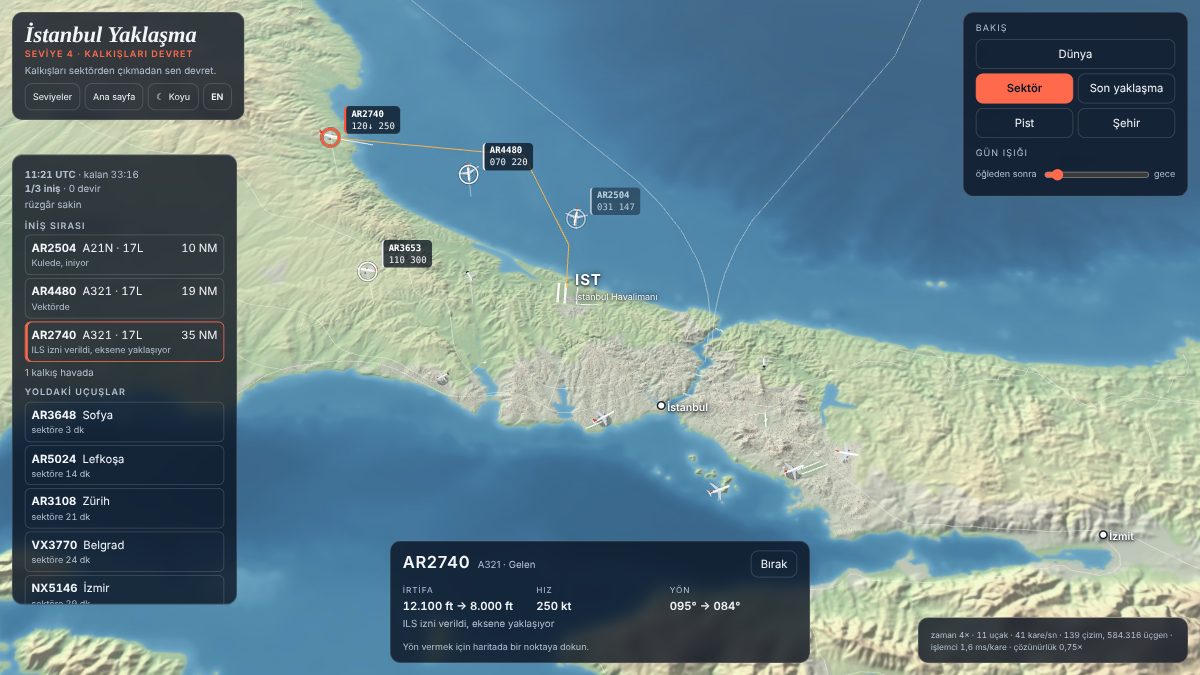
There is no radar screen. Above Istanbul, over real terrain and real runways, you sequence aircraft, bring them down to the runway and send departures on their way.
PlayRuns in your browser, no account needed. The first start downloads about 12 MB of world data.
What is Gander?
Gander is an air traffic management game by Bumba Games. You are not the pilot; you are the approach controller handling traffic into and out of Istanbul Airport.
Who it is for: anyone curious about aviation or fond of strategy and management games. No aviation knowledge is needed; the first levels teach step by step.
Where: in a desktop or phone browser at gander.bumba.tr, in Turkish and English.
For now the first seat is ready: approach control (ATC). The tower and airline seats are in the works.
What is in the game?
A 3D Istanbul
Real terrain, the Bosphorus and its three bridges, five airfields (Istanbul, Atatürk, Sabiha Gökçen, Hezarfen, Samandıra). The camera goes from a world view down to the runway.
Real rules
ILS approaches, 3 NM or 1,000 ft separation, wake spacing behind heavy aircraft, go-arounds when the runway is occupied. Time is compressed; the rules are real.
A built-in timetable
98 routes and hundreds of flights a day. You are notified when an aircraft departs; the world view shows where it took off, where it is and when it will enter your sector.
Time follows your zoom
Time runs fast in the world view, normally in the sector and slowly on final approach, so you have room to think when it matters.
16 levels in four stages
From assisted levels to a full simulation: first only the ILS clearance, then altitude, speed and headings are yours, followed by wind, holding and parallel runways.
Shift events
Medical emergencies, minimum fuel, diverting to the alternate, a runway change when the wind turns, runway inspections. In the top levels, all in one shift.
How do you play?
Pick a level
The first level is very simple: one aircraft, one runway. Each level is a little harder than the last.
Tap an aircraft and clear it for the ILS
A cleared aircraft turns onto the runway centreline, captures the glideslope and lands.
Give headings, altitudes and speeds
Tap a point on the map and the aircraft turns towards it. Altitude and speed buttons are on the selected aircraft’s card.
Hand off departures
Departing aircraft are handed to the next sector before they leave yours.
Finish the shift
At the end you earn up to three stars for landings, go-arounds and separation.
Levels
Levels come in four stages. Pass a level with at least one star to unlock the next.
Assisted (1–4)
Suggested paths, automatic altitude and speed. You only build the sequence.
- First landing
- Building a sequence
- Spacing is yours
- Hand off departures
Manual altitude and speed (5–8)
The assists drop away one by one; level 8 opens landings on two parallel runways.
- Altitude is yours
- Speed too
- Headings are yours
- Two runways
Wind and holding (9–12)
Headwinds and crosswinds, holding, the alternate airport, the first emergencies, three landing runways.
- Headwind
- Crosswind
- Strong crosswind
- Three runways
Simulation (13–16)
A runway change when the wind turns, runway inspections, morning and evening waves, the full timetable.
- Runway change
- Evening wave
- Morning wave
- Full shift
Badges
There are 19 badges to earn as you play: from your first landing to the full shift, from your first emergency to every star.
Your badges and progress are stored only in this browser until you delete them. Privacy notice
Frequently asked questions
Do I fly the aircraft in Gander?
No. There is no piloting; you are the controller on the ground. You give headings, altitudes, speeds and approach clearances, and the pilots fly.
Are the flights real?
Traffic comes from a timetable built into the game and based on real-world routes; no live flight data is used. The airline names are fictional.
Does it work on a phone?
Yes, in an up-to-date phone browser. Rendering quality adapts to the device; a wide screen is the most comfortable.
Do I need an account? Where is my progress kept?
You do not. Your level stars and badges are stored only in this browser until you delete them. You can create an account if you like; for now it only keeps your profile and preferences.
Can it be used for real air traffic control?
No. Gander is a game. The rules stay close to reality so that they teach something, but the data is for the game only; it is not a training or navigation tool.
How is it different from Airspace Control?
Airspace Control is a classic radar-screen game. Gander has no radar screen: it has a 3D world, touch commands and a built-in timetable.
Data and sources
Terrain, coastline, settlement and runway data are generated from open sources (OurAirports, Natural Earth, Terrain Tiles, OpenStreetMap contributors). All data is for the game only and must not be used for real-world navigation.